Spending Control for Finance Teams
for Microsoft Dynamics 365 Business Central
Expenses and travel costs – automatically in the accounting system.
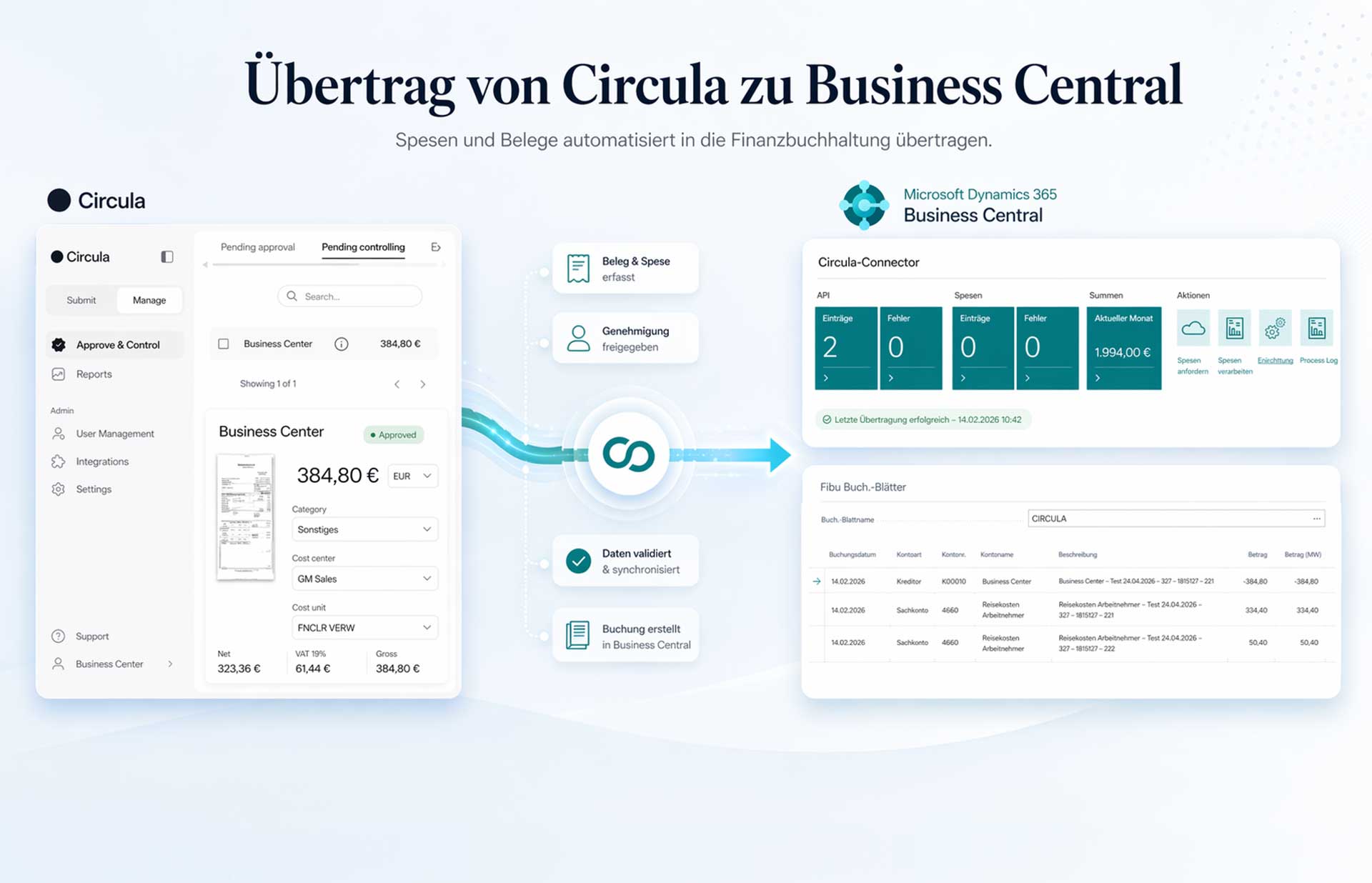
Finclair’s Circula Connector seamlessly integrates the leading expense management software Circula with Microsoft Dynamics 365 Business Central. Say goodbye to manual exports, duplicate data entry, and error-prone booking processes: Approved expenses are fully coded and ready for posting directly into your financial accounting system.
What is the Circula Connector?
Circula is a modern solution for travel expense and reimbursement that helps employees easily capture receipts via smartphone, document business trips, and calculate mileage allowances. What was missing until now: a direct, reliable connection to the ERP system.

The Finclair Circula Connector closes this gap. The extension is fully integrated into Business Central and automatically transfers approved expense reports to the Circula Expense Buffer – from there, the entries are transferred to the general ledger journal and posted with a single click.
From approved receipt to booking
Only approved and verified expenses will be transferred – including original receipts.
Circula
Expenses and travel costs
Finclair Connector
Validation & Transfer
Business Central
Accounting Journal & Booking
This is how the process works
Data collection by employees
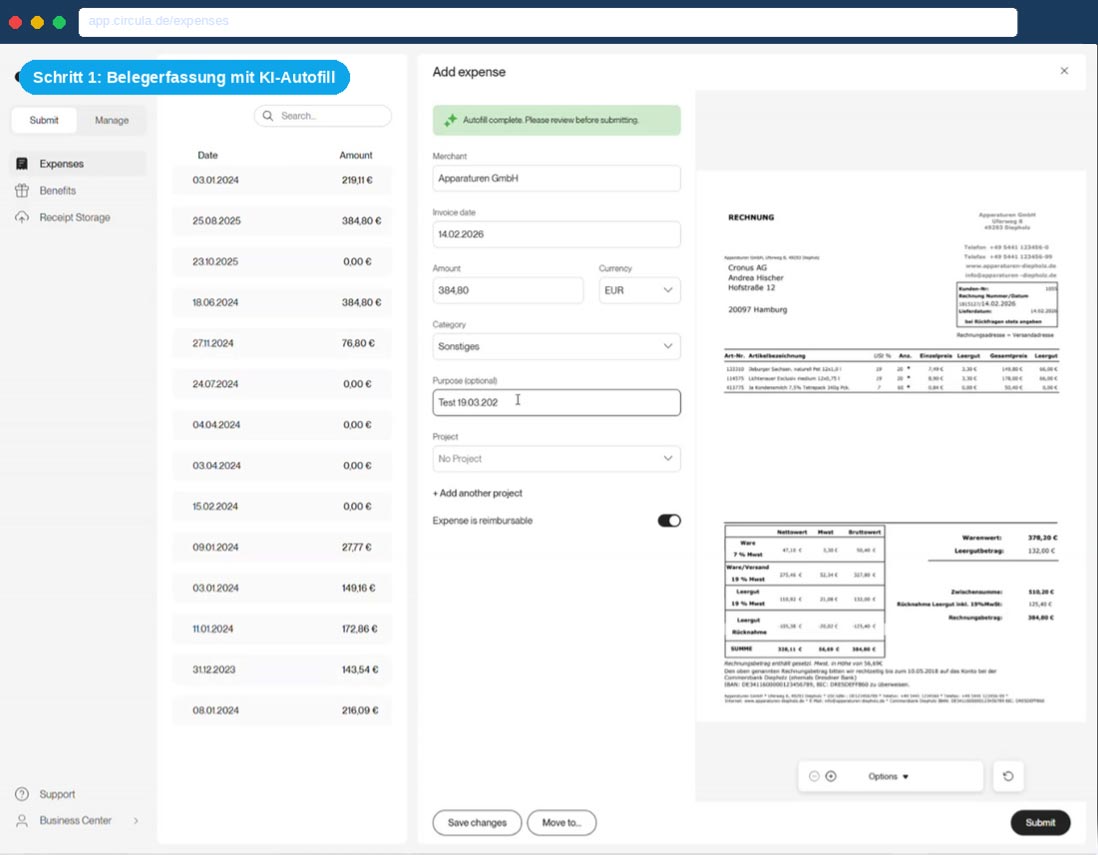
- KI-Autofill: Upload a photo of the receipt – Circula automatically recognizes the amount, date and merchant.
- Travel expenses:
- Mileage allowance: Enter start and destination addresses, select vehicle type – distance and amount are calculated immediately.
- Project booking: Expenses can be directly assigned to a project for precise cost center allocation.
Step 1: Receipt capture with AI autofill
Approval & Controlling in Circula
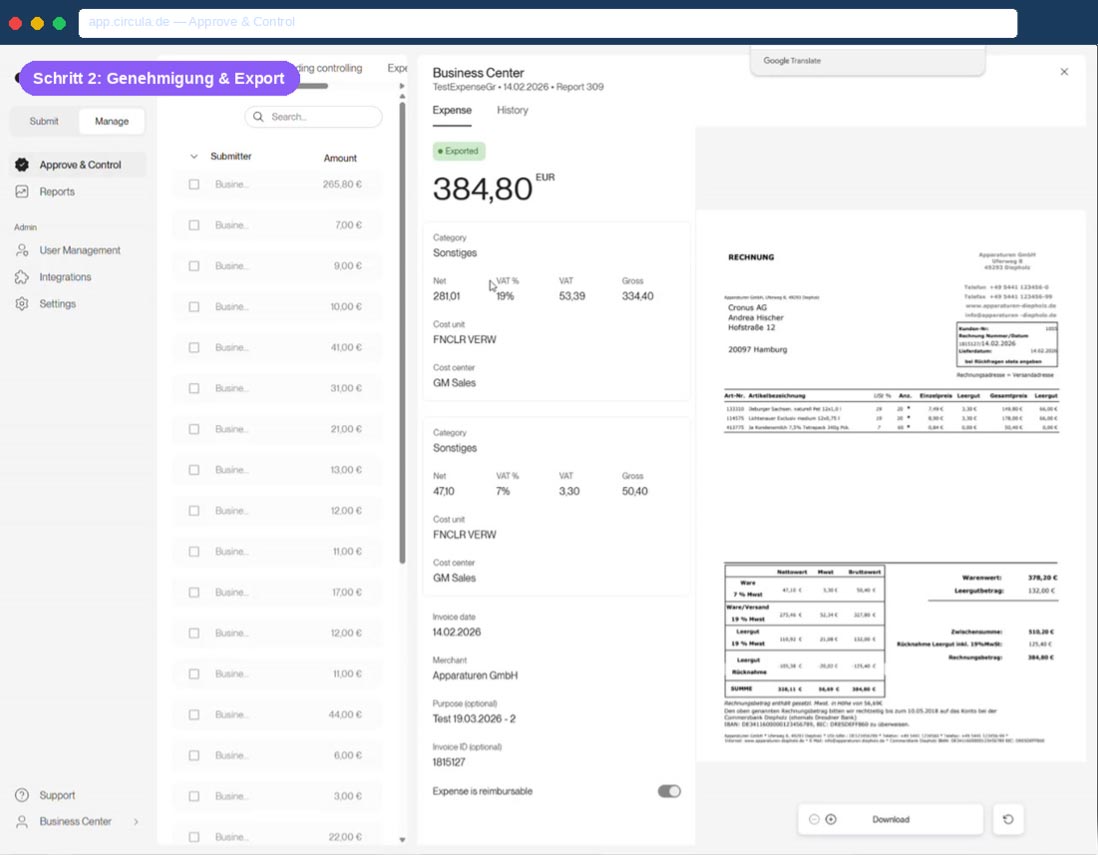
- Responsible supervisors review and approve expenditures in the Approve & Control area.
- The controlling team filters and processes pending entries in a targeted manner.
- Approved documents automatically receive the status “Exported” and are ready for BC transfer.
Step 2: Approval & Export
Automatic transfer to Business Central
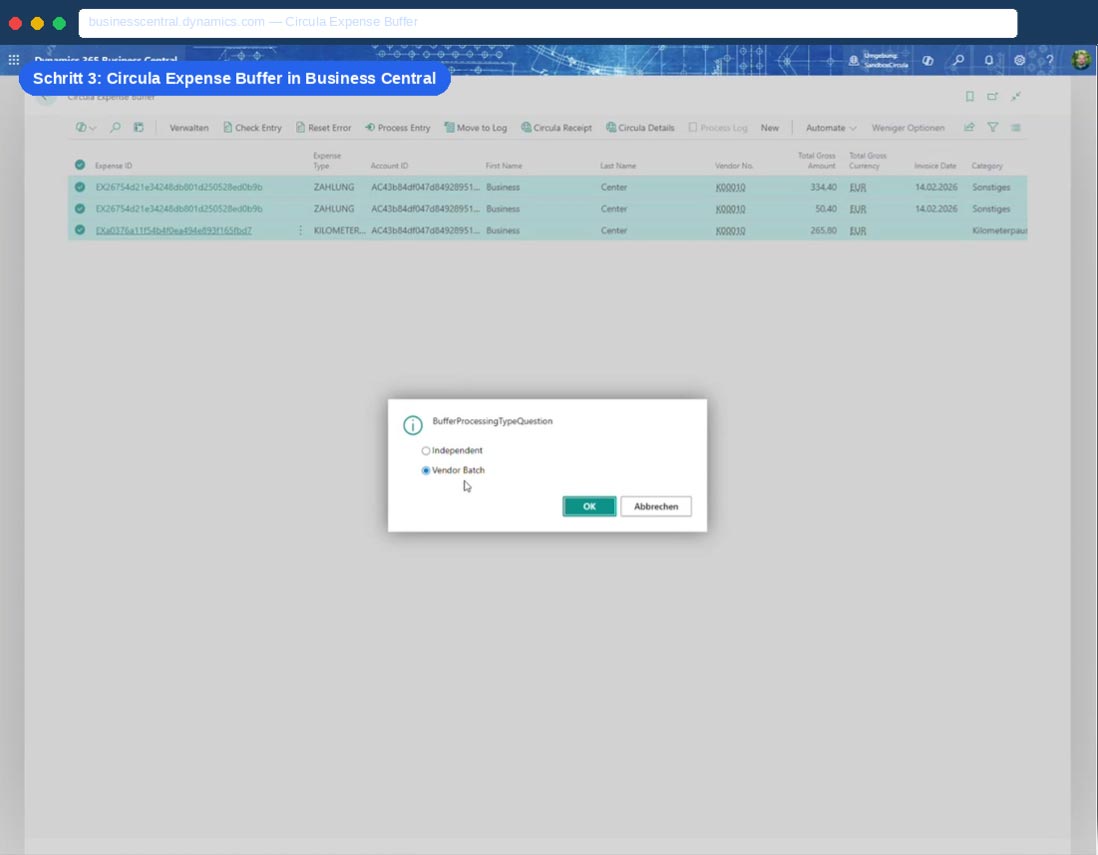
- Approved entries appear in the Circula Expense Buffer in Business Central – fully structured.
- Expense type, amount, currency, receipt date and employee data are transferred directly.
- Process Entry: Automatically generates correct journal entries with vendor account and general ledger account (e.g., 4660 – Employee travel expenses).
- Original receipts remain accessible at any time from BC via Circula Receipt & Details.
Step 3: Circular Expense Buffer in Business Central
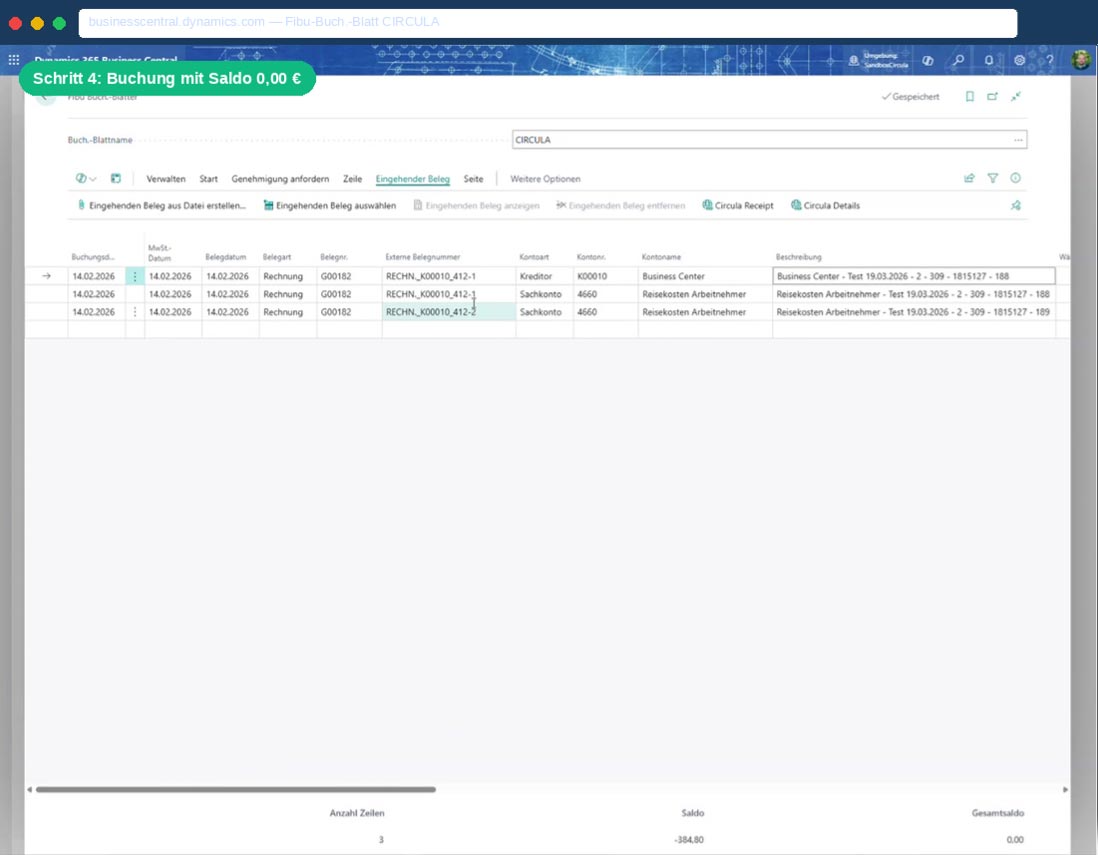
Entry in the accounting ledger. - Sheet
- Processed lines end up in the accounting book sheet, filtered by the sheet name CIRCULA.
- Final booking with a confirmation click – all entries are complete and balanced.
- The total balance is €0.00 – no manual corrections are needed.
Step 4: Booking with a balance of €0.00
Your advantages at a glance
No media break
Automatic account assignment
Ready-to-book lines with correct general ledger and creditor accounts, adapted to your chart of accounts.
Seamless User Experience
Employees use Circula, the accounting department works in BC – the connector works invisibly.
Time savings in accounting
What used to take hours, the Connector now accomplishes in minutes – allowing for more value-adding work.
Full transparency & compliance
Documents, approval history and booking status can be viewed at any time in an audit-proof manner.
Fast implementation
Native BC extension without middleware – no complex IT project, quickly productive.
Who is the Circula Connector suitable for?
The connector is aimed at companies that:
- Using Microsoft Dynamics 365 Business Central
- Want to use or implement Circula as an expense and travel cost solution?
- want to automate the connection between the two systems
- want to eliminate manual booking processes in the area of travel expenses
| Merkmal | Details |
|---|---|
| ERP-Plattform | Microsoft Dynamics 365 Business Central |
| Spesenplattform | Circula |
| Integration | Native BC-Extension (AppSource-kompatibel) |
| Übertragungsweg | Circula Expense Buffer → Fibu-Buch.-Blatt |
| Ausgabenarten | Zahlungen, Reisekosten, Kilometerpauschale |
| Belegzugriff | Direkt via Circula Receipt & Details |
| Kontierung | Automatisch: Kreditorenkonto + Sachkonto |
| Workflow | Approve & Control in Circula |
Transparent and flexible
Monthly license
* Price per client / monthly
One-time license
Our pricing for the Finclair Circula Connector is based on the number of connected clients:
Included in all packages
- Complete setup via guided wizard
- Ongoing updates and further development of the solution
- Technical support via email and phone
- Documentation and training materials
- Compatibility with all current Business Central versions
All prices are subject to applicable VAT. For individual tiered pricing for very large law firm portfolios, please contact us directly.
Request a free consultation and demo now.
Do you want to use the Circula Connector in your Business Central environment? We will show you in a personal demo how the process looks in your specific system landscape.